Articles by "Blogspot"
Showing posts with label Blogspot. Show all posts

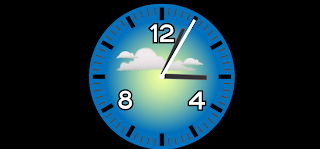
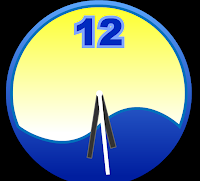
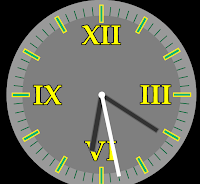
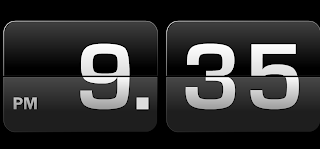
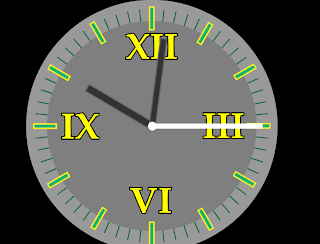
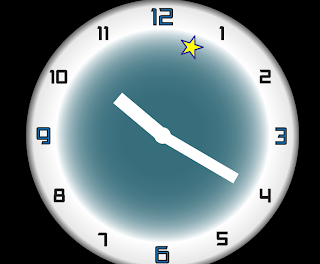
Today we give you Animated flash clock widget for your blogger blog. We are providing full tutorial and codes To Add Animated Flash Clock To Your Blogger Blog easily. This animated clock show time with animated flash and give you beautiful look for your website. Every blogger want to add clock on their blog, website, forum etc. because it is necessary for some blogs or forum. You can add this animated clock to your blog easily with follow some easy steps. I am providing you full working tested codes for all browser, you need just copy paste codes on your blog and some changes according to your blog.


Animated Flash Clock

Animated Flash Clock Widget for Blogger

Follow below steps to add Animated Flash Clock Widget for Blogger:

Step 1

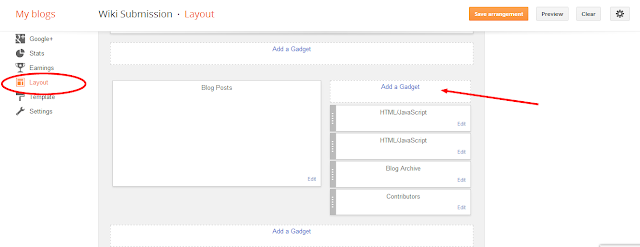
Log in into your Blogger Account and Go to Blogger Dashboard. Click on Layout tab at the left panel and click on Add a Gadget Link. See below picture for your help.
Animated Clock

Step 2

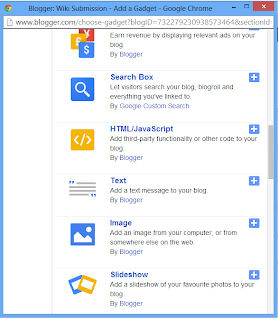
After click on Add a Gadget a popup window will open with all Gadgets list. Please select HTML/JavaScripts from Gadgets list as shown in below picture.
Animated Flash Clock Widget

Step 3


Now Select your Animated clock at below and paste their below code into HTML box:
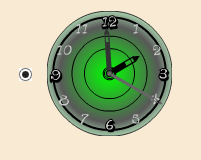
Style 1

How To Add Animated Flash Clock Widget for Blogger


<center><object type="application/x-shockwave-flash" data="http://usefbcover.com/public/animated1.swf" width="150" height="150"><param name="movie" value="http://usefbcover.com/public/animated1.swf"></param><param name="allowscriptaccess" value="always"></param><param name="menu" value="false"></param><param name="wmode" value="transparent"></param><embed src="http://usefbcover.com/public/animated1.swf" type="application/x-shockwave-flash" allowscriptaccess="always" width="150" height="150" menu="false" wmode="transparent"></embed></object></center><div style="font-family: arial, sans-serif; font-size: 8px;" class="ycdr"><a href="http://www.haakblog.com/2013/11/add-animated-flash-clock-widget-blogger.html" target="_blank" title="Animated Clock">Animated Clock</a> <a href="http://www.haakblog.com/" target="_blank">Blogger</a></div>

Style 2 

How To Add Animated Flash Clock Widget for Blogger


<center><object type="application/x-shockwave-flash" data="http://usefbcover.com/public/animated2.swf" width="150" height="150"><param name="movie" value="http://usefbcover.com/public/animated2.swf"></param><param name="allowscriptaccess" value="always"></param><param name="menu" value="false"></param><param name="wmode" value="transparent"></param><embed src="http://usefbcover.com/public/animated2.swf" type="application/x-shockwave-flash" allowscriptaccess="always" width="150" height="150" menu="false" wmode="transparent"></embed></object></center><div style="font-family: arial, sans-serif; font-size: 8px;" class="ycdr"><a href="http://www.haakblog.com/2013/11/add-animated-flash-clock-widget-blogger.html" target="_blank" title="Animated Clock">Animated Clock</a> <a href="http://www.haakblog.com/" target="_blank">Blogger</a></div> 

Style 3

How To Add Animated Flash Clock Widget for Blogger


<center><object type="application/x-shockwave-flash" data="http://usefbcover.com/public/animated3.swf" width="150" height="150"><param name="movie" value="http://usefbcover.com/public/animated3.swf"></param><param name="allowscriptaccess" value="always"></param><param name="menu" value="false"></param><param name="wmode" value="transparent"></param><embed src="http://usefbcover.com/public/animated3.swf" type="application/x-shockwave-flash" allowscriptaccess="always" width="150" height="150" menu="false" wmode="transparent"></embed></object></center><div style="font-family: arial, sans-serif; font-size: 8px;" class="ycdr"><a href="http://www.haakblog.com/2013/11/add-animated-flash-clock-widget-blogger.html" target="_blank" title="Animated Clock">Animated Clock</a> <a href="http://www.haakblog.com/" target="_blank">Blogger</a></div>

Style 4 

How To Add Animated Flash Clock Widget for Blogger


<center><object type="application/x-shockwave-flash" data="http://usefbcover.com/public/animated4.swf" width="150" height="150"><param name="movie" value="http://usefbcover.com/public/animated4.swf"></param><param name="allowscriptaccess" value="always"></param><param name="menu" value="false"></param><param name="wmode" value="transparent"></param><embed src="http://usefbcover.com/public/animated4.swf" type="application/x-shockwave-flash" allowscriptaccess="always" width="150" height="150" menu="false" wmode="transparent"></embed></object></center><div style="font-family: arial, sans-serif; font-size: 8px;" class="ycdr"><a href="http://www.haakblog.com/2013/11/add-animated-flash-clock-widget-blogger.html" target="_blank" title="Animated Clock">Animated Clock</a> <a href="http://www.haakblog.com/" target="_blank">Blogger</a></div>

Style 5

How To Add Animated Flash Clock Widget for Blogger


<center><object type="application/x-shockwave-flash" data="http://usefbcover.com/public/animated5.swf" width="150" height="150"><param name="movie" value="http://usefbcover.com/public/animated5.swf"></param><param name="allowscriptaccess" value="always"></param><param name="menu" value="false"></param><param name="wmode" value="transparent"></param><embed src="http://usefbcover.com/public/animated5.swf" type="application/x-shockwave-flash" allowscriptaccess="always" width="150" height="150" menu="false" wmode="transparent"></embed></object></center><div style="font-family: arial, sans-serif; font-size: 8px;" class="ycdr"><a href="http://www.haakblog.com/2013/11/add-animated-flash-clock-widget-blogger.html" target="_blank" title="Animated Clock">Animated Clock</a> <a href="http://www.haakblog.com/" target="_blank">Blogger</a></div>

Style 6

How To Add Animated Flash Clock Widget for Blogger


<center><object type="application/x-shockwave-flash" data="http://usefbcover.com/public/animated6.swf" width="150" height="150"><param name="movie" value="http://usefbcover.com/public/animated6.swf"></param><param name="allowscriptaccess" value="always"></param><param name="menu" value="false"></param><param name="wmode" value="transparent"></param><embed src="http://usefbcover.com/public/animated6.swf" type="application/x-shockwave-flash" allowscriptaccess="always" width="150" height="150" menu="false" wmode="transparent"></embed></object></center><div style="font-family: arial, sans-serif; font-size: 8px;" class="ycdr"><a href="http://www.haakblog.com/2013/11/add-animated-flash-clock-widget-blogger.html" target="_blank" title="Animated Clock">Animated Clock</a> <a href="http://www.haakblog.com/" target="_blank">Blogger</a></div>

Style 7

Animated Flash Clock Widget for Blogger


<center><object type="application/x-shockwave-flash" data="http://usefbcover.com/public/animated7.swf" width="150" height="150"><param name="movie" value="http://usefbcover.com/public/animated7.swf"></param><param name="allowscriptaccess" value="always"></param><param name="menu" value="false"></param><param name="wmode" value="transparent"></param><embed src="http://usefbcover.com/public/animated7.swf" type="application/x-shockwave-flash" allowscriptaccess="always" width="150" height="150" menu="false" wmode="transparent"></embed></object></center><div style="font-family: arial, sans-serif; font-size: 8px;" class="ycdr"><a href="http://www.haakblog.com/2013/11/add-animated-flash-clock-widget-blogger.html" target="_blank" title="Animated Clock">Animated Clock</a> <a href="http://www.haakblog.com/" target="_blank">Blogger</a></div>

Style 8 

How To Add Animated Flash Clock Widget for Blogger


<center><object type="application/x-shockwave-flash" data="http://usefbcover.com/public/animated8.swf" width="150" height="150"><param name="movie" value="http://usefbcover.com/public/animated8.swf"></param><param name="allowscriptaccess" value="always"></param><param name="menu" value="false"></param><param name="wmode" value="transparent"></param><embed src="http://usefbcover.com/public/animated8.swf" type="application/x-shockwave-flash" allowscriptaccess="always" width="150" height="150" menu="false" wmode="transparent"></embed></object></center><div style="font-family: arial, sans-serif; font-size: 8px;" class="ycdr"><a href="http://www.haakblog.com/2013/11/add-animated-flash-clock-widget-blogger.html" target="_blank" title="Animated Clock">Animated Clock</a> <a href="http://www.haakblog.com/" target="_blank">Blogger</a></div>

Style 9

How To Add Animated Flash Clock Widget for Blogger


<center><object type="application/x-shockwave-flash" data="http://usefbcover.com/public/animated9.swf" width="150" height="150"><param name="movie" value="http://usefbcover.com/public/animated9.swf"></param><param name="allowscriptaccess" value="always"></param><param name="menu" value="false"></param><param name="wmode" value="transparent"></param><embed src="http://usefbcover.com/public/animated9.swf" type="application/x-shockwave-flash" allowscriptaccess="always" width="150" height="150" menu="false" wmode="transparent"></embed></object></center><div style="font-family: arial, sans-serif; font-size: 8px;" class="ycdr"><a href="http://www.haakblog.com/2013/11/add-animated-flash-clock-widget-blogger.html" target="_blank" title="Animated Clock">Animated Clock</a> <a href="http://www.haakblog.com/" target="_blank">Blogger</a></div>

Style 10

How To Add Animated Flash Clock Widget for Blogger


<center><object type="application/x-shockwave-flash" data="http://usefbcover.com/public/animated10.swf" width="150" height="150"><param name="movie" value="http://usefbcover.com/public/animated10.swf"></param><param name="allowscriptaccess" value="always"></param><param name="menu" value="false"></param><param name="wmode" value="transparent"></param><embed src="http://usefbcover.com/public/animated10.swf" type="application/x-shockwave-flash" allowscriptaccess="always" width="150" height="150" menu="false" wmode="transparent"></embed></object></center><div style="font-family: arial, sans-serif; font-size: 8px;" class="ycdr"><a href="http://www.haakblog.com/2013/11/add-animated-flash-clock-widget-blogger.html" target="_blank" title="Animated Clock">Animated Clock</a> <a href="http://www.haakblog.com/" target="_blank">Blogger</a></div>

Wish you Mary Christmas in advance. Christmas is one of the biggest festivals in the world. So here I am with one of the best widgets for the blogger. Here I am going to show you how to How To Add Snow Falling Effect To Blogger [Christmas Special], to apply this effect it required to add small JavaScript to your blog.

This Widget does not affect your template or your website. It is 100% virus free. It is very fast and easy to add to your website.

How To Add Snow Falling Effect To Blogger

Step 1: Log in to your Blogger and go to "Layout" > Click the "Add a Gadget".


Step 2: From the pop-up window, scroll down and choose HTML/JavaScript from the list.


Step 3: Paste the code given below.

<script type="text/javascript">

var snowStorm=(function(window,document){this.autoStart=true;this.flakesMax=60;this.flakesMaxActive=60;this.animationInterval=40;this.excludeMobile=true;this.flakeBottom=null;this.followMouse=true;this.snowColor='#fff';this.snowCharacter='&bull;';this.snowStick=false;this.targetElement=null;this.useMeltEffect=true;this.useTwinkleEffect=false;this.usePositionFixed=false;this.freezeOnBlur=true;this.flakeLeftOffset=0;this.flakeRightOffset=0;this.flakeWidth=5;this.flakeHeight=5;this.vMaxX=2.5;this.vMaxY=2.5;this.zIndex=100000;var s=this,storm=this,i,isIE=navigator.userAgent.match(/msie/i),isIE6=navigator.userAgent.match(/msie 6/i),isWin98=navigator.appVersion.match(/windows 98/i),isMobile=navigator.userAgent.match(/mobile|opera m(ob|in)/i),isBackCompatIE=(isIE&&document.compatMode==='BackCompat'),noFixed=(isMobile||isBackCompatIE||isIE6),screenX=null,screenX2=null,screenY=null,scrollY=null,vRndX=null,vRndY=null,windOffset=1,windMultiplier=2,flakeTypes=6,fixedForEverything=false,opacitySupported=(function(){try{document.createElement('div').style.opacity='0.5';}catch(e){return false;}
return true;}()),didInit=false,docFrag=document.createDocumentFragment();this.timers=[];this.flakes=[];this.disabled=false;this.active=false;this.meltFrameCount=20;this.meltFrames=[];this.events=(function(){var old=(!window.addEventListener&&window.attachEvent),slice=Array.prototype.slice,evt={add:(old?'attachEvent':'addEventListener'),remove:(old?'detachEvent':'removeEventListener')};function getArgs(oArgs){var args=slice.call(oArgs),len=args.length;if(old){args[1]='on'+args[1];if(len>3){args.pop();}}else if(len===3){args.push(false);}
return args;}
function apply(args,sType){var element=args.shift(),method=[evt[sType]];if(old){element[method](args[0],args[1]);}else{element[method].apply(element,args);}}
function addEvent(){apply(getArgs(arguments),'add');}
function removeEvent(){apply(getArgs(arguments),'remove');}
return{add:addEvent,remove:removeEvent};}());function rnd(n,min){if(isNaN(min)){min=0;}
return(Math.random()*n)+min;}
function plusMinus(n){return(parseInt(rnd(2),10)===1?n*-1:n);}
this.randomizeWind=function(){var i;vRndX=plusMinus(rnd(s.vMaxX,0.2));vRndY=rnd(s.vMaxY,0.2);if(this.flakes){for(i=0;i<this.flakes.length;i++){if(this.flakes[i].active){this.flakes[i].setVelocities();}}}};this.scrollHandler=function(){var i;scrollY=(s.flakeBottom?0:parseInt(window.scrollY||document.documentElement.scrollTop||document.body.scrollTop,10));if(isNaN(scrollY)){scrollY=0;}
if(!fixedForEverything&&!s.flakeBottom&&s.flakes){for(i=s.flakes.length;i--;){if(s.flakes[i].active===0){s.flakes[i].stick();}}}};this.resizeHandler=function(){if(window.innerWidth||window.innerHeight){screenX=window.innerWidth-16-s.flakeRightOffset;screenY=(s.flakeBottom?s.flakeBottom:window.innerHeight);}else{screenX=(document.documentElement.clientWidth||document.body.clientWidth||document.body.scrollWidth)-(!isIE?8:0)-s.flakeRightOffset;screenY=s.flakeBottom?s.flakeBottom:(document.documentElement.clientHeight||document.body.clientHeight||document.body.scrollHeight);}
screenX2=parseInt(screenX/2,10);};this.resizeHandlerAlt=function(){screenX=s.targetElement.offsetLeft+s.targetElement.offsetWidth-s.flakeRightOffset;screenY=s.flakeBottom?s.flakeBottom:s.targetElement.offsetTop+s.targetElement.offsetHeight;screenX2=parseInt(screenX/2,10);};this.freeze=function(){var i;if(!s.disabled){s.disabled=1;}else{return false;}
for(i=s.timers.length;i--;){clearInterval(s.timers[i]);}};this.resume=function(){if(s.disabled){s.disabled=0;}else{return false;}
s.timerInit();};this.toggleSnow=function(){if(!s.flakes.length){s.start();}else{s.active=!s.active;if(s.active){s.show();s.resume();}else{s.stop();s.freeze();}}};this.stop=function(){var i;this.freeze();for(i=this.flakes.length;i--;){this.flakes[i].o.style.display='none';}
s.events.remove(window,'scroll',s.scrollHandler);s.events.remove(window,'resize',s.resizeHandler);if(s.freezeOnBlur){if(isIE){s.events.remove(document,'focusout',s.freeze);s.events.remove(document,'focusin',s.resume);}else{s.events.remove(window,'blur',s.freeze);s.events.remove(window,'focus',s.resume);}}};this.show=function(){var i;for(i=this.flakes.length;i--;){this.flakes[i].o.style.display='block';}};this.SnowFlake=function(parent,type,x,y){var s=this,storm=parent;this.type=type;this.x=x||parseInt(rnd(screenX-20),10);this.y=(!isNaN(y)?y:-rnd(screenY)-12);this.vX=null;this.vY=null;this.vAmpTypes=[1,1.2,1.4,1.6,1.8];this.vAmp=this.vAmpTypes[this.type];this.melting=false;this.meltFrameCount=storm.meltFrameCount;this.meltFrames=storm.meltFrames;this.meltFrame=0;this.twinkleFrame=0;this.active=1;this.fontSize=(10+(this.type/5)*10);this.o=document.createElement('div');this.o.innerHTML=storm.snowCharacter;this.o.style.color=storm.snowColor;this.o.style.position=(fixedForEverything?'fixed':'absolute');this.o.style.width=storm.flakeWidth+'px';this.o.style.height=storm.flakeHeight+'px';this.o.style.fontFamily='arial,verdana';this.o.style.cursor='default';this.o.style.overflow='hidden';this.o.style.fontWeight='normal';this.o.style.zIndex=storm.zIndex;docFrag.appendChild(this.o);this.refresh=function(){if(isNaN(s.x)||isNaN(s.y)){return false;}
s.o.style.left=s.x+'px';s.o.style.top=s.y+'px';};this.stick=function(){if(noFixed||(storm.targetElement!==document.documentElement&&storm.targetElement!==document.body)){s.o.style.top=(screenY+scrollY-storm.flakeHeight)+'px';}else if(storm.flakeBottom){s.o.style.top=storm.flakeBottom+'px';}else{s.o.style.display='none';s.o.style.top='auto';s.o.style.bottom='0px';s.o.style.position='fixed';s.o.style.display='block';}};this.vCheck=function(){if(s.vX>=0&&s.vX<0.2){s.vX=0.2;}else if(s.vX<0&&s.vX>-0.2){s.vX=-0.2;}
if(s.vY>=0&&s.vY<0.2){s.vY=0.2;}};this.move=function(){var vX=s.vX*windOffset,yDiff;s.x+=vX;s.y+=(s.vY*s.vAmp);if(s.x>=screenX||screenX-s.x<storm.flakeWidth){s.x=0;}else if(vX<0&&s.x-storm.flakeLeftOffset<-storm.flakeWidth){s.x=screenX-storm.flakeWidth-1;}
s.refresh();yDiff=screenY+scrollY-s.y;if(yDiff<storm.flakeHeight){s.active=0;if(storm.snowStick){s.stick();}else{s.recycle();}}else{if(storm.useMeltEffect&&s.active&&s.type<3&&!s.melting&&Math.random()>0.998){s.melting=true;s.melt();}
if(storm.useTwinkleEffect){if(!s.twinkleFrame){if(Math.random()>0.9){s.twinkleFrame=parseInt(Math.random()*20,10);}}else{s.twinkleFrame--;s.o.style.visibility=(s.twinkleFrame&&s.twinkleFrame%2===0?'hidden':'visible');}}}};this.animate=function(){s.move();};this.setVelocities=function(){s.vX=vRndX+rnd(storm.vMaxX*0.12,0.1);s.vY=vRndY+rnd(storm.vMaxY*0.12,0.1);};this.setOpacity=function(o,opacity){if(!opacitySupported){return false;}
o.style.opacity=opacity;};this.melt=function(){if(!storm.useMeltEffect||!s.melting){s.recycle();}else{if(s.meltFrame<s.meltFrameCount){s.setOpacity(s.o,s.meltFrames[s.meltFrame]);s.o.style.fontSize=s.fontSize-(s.fontSize*(s.meltFrame/s.meltFrameCount))+'px';s.o.style.lineHeight=storm.flakeHeight+2+(storm.flakeHeight*0.75*(s.meltFrame/s.meltFrameCount))+'px';s.meltFrame++;}else{s.recycle();}}};this.recycle=function(){s.o.style.display='none';s.o.style.position=(fixedForEverything?'fixed':'absolute');s.o.style.bottom='auto';s.setVelocities();s.vCheck();s.meltFrame=0;s.melting=false;s.setOpacity(s.o,1);s.o.style.padding='0px';s.o.style.margin='0px';s.o.style.fontSize=s.fontSize+'px';s.o.style.lineHeight=(storm.flakeHeight+2)+'px';s.o.style.textAlign='center';s.o.style.verticalAlign='baseline';s.x=parseInt(rnd(screenX-storm.flakeWidth-20),10);s.y=parseInt(rnd(screenY)*-1,10)-storm.flakeHeight;s.refresh();s.o.style.display='block';s.active=1;};this.recycle();this.refresh();};this.snow=function(){var active=0,used=0,waiting=0,flake=null,i;for(i=s.flakes.length;i--;){if(s.flakes[i].active===1){s.flakes[i].move();active++;}else if(s.flakes[i].active===0){used++;}else{waiting++;}
if(s.flakes[i].melting){s.flakes[i].melt();}}
if(active<s.flakesMaxActive){flake=s.flakes[parseInt(rnd(s.flakes.length),10)];if(flake.active===0){flake.melting=true;}}};this.mouseMove=function(e){if(!s.followMouse){return true;}
var x=parseInt(e.clientX,10);if(x<screenX2){windOffset=-windMultiplier+(x/screenX2*windMultiplier);}else{x-=screenX2;windOffset=(x/screenX2)*windMultiplier;}};this.createSnow=function(limit,allowInactive){var i;for(i=0;i<limit;i++){s.flakes[s.flakes.length]=new s.SnowFlake(s,parseInt(rnd(flakeTypes),10));if(allowInactive||i>s.flakesMaxActive){s.flakes[s.flakes.length-1].active=-1;}}
storm.targetElement.appendChild(docFrag);};this.timerInit=function(){s.timers=(!isWin98?[setInterval(s.snow,s.animationInterval)]:[setInterval(s.snow,s.animationInterval*3),setInterval(s.snow,s.animationInterval)]);};this.init=function(){var i;for(i=0;i<s.meltFrameCount;i++){s.meltFrames.push(1-(i/s.meltFrameCount));}
s.randomizeWind();s.createSnow(s.flakesMax);s.events.add(window,'resize',s.resizeHandler);s.events.add(window,'scroll',s.scrollHandler);if(s.freezeOnBlur){if(isIE){s.events.add(document,'focusout',s.freeze);s.events.add(document,'focusin',s.resume);}else{s.events.add(window,'blur',s.freeze);s.events.add(window,'focus',s.resume);}}
s.resizeHandler();s.scrollHandler();if(s.followMouse){s.events.add(isIE?document:window,'mousemove',s.mouseMove);}
s.animationInterval=Math.max(20,s.animationInterval);s.timerInit();};this.start=function(bFromOnLoad){if(!didInit){didInit=true;}else if(bFromOnLoad){return true;}
if(typeof s.targetElement==='string'){var targetID=s.targetElement;s.targetElement=document.getElementById(targetID);if(!s.targetElement){throw new Error('Snowstorm: Unable to get targetElement "'+targetID+'"');}}
if(!s.targetElement){s.targetElement=(!isIE?(document.documentElement?document.documentElement:document.body):document.body);}
if(s.targetElement!==document.documentElement&&s.targetElement!==document.body){s.resizeHandler=s.resizeHandlerAlt;}
s.resizeHandler();s.usePositionFixed=(s.usePositionFixed&&!noFixed);fixedForEverything=s.usePositionFixed;if(screenX&&screenY&&!s.disabled){s.init();s.active=true;}};function doDelayedStart(){window.setTimeout(function(){s.start(true);},20);s.events.remove(isIE?document:window,'mousemove',doDelayedStart);}
function doStart(){if(!s.excludeMobile||!isMobile){if(s.freezeOnBlur){s.events.add(isIE?document:window,'mousemove',doDelayedStart);}else{doDelayedStart();}}
s.events.remove(window,'load',doStart);}
if(s.autoStart){s.events.add(window,'load',doStart,false);}
return this;}(window,document));</script>


So above is all about How To Add Snow Falling Effect To Blogger. With these, you can easily you can attract viewers. So use this widget and best of luck to your website.Hope you like our work, do share it with others too. Leave a comment if you have any related queries with this.

SumoMe is the most complete social sharing service allowing you to share your posts on more than 200 + social networks. If you want to use this widget & get the Sumo Me Sharing buttons, from this article. I hope this article will help you!


SumoMe is used to share your posts. Sharing bring more visitors to your Website or WordPress or Blogger. It is the responsible widget.

How To Add Floating Share Buttons For Blogger

Step 1: Log in to your Blogger and go to "Layout" > click the "Add a Gadget".


Step 2: From the pop-up window, scroll down and choose HTML/JavaScript from the list.


Step 3: Paste the code given below.


<script async='async' data-sumo-site-id='56583c832f550d7eac478ad17d8787550967a02b56cb2dfacfd0d5e443401473' src='//load.sumome.com/'/></script>
Step 4: Save the widget

Social media helps the Blog owner to grow their Blog traffic indirectly. You won’t able to reach with your publish content towards maximum number of people. But If you share your content on various social media site then this will help you to increase your Blog traffic from social media. Whenever we share any content in social media site like Facebook, Twitter etc then  instantly social media site send the content on their news feed and send a notification to its page Fans and followers. As a result there has a chance to visit read your content through social media site.


Now a day’s social media sites are helping to grow a Blog site from foundation to peak. So we must use social media site to grow our own Blog. However for our existing Blog visitors we should add some social media widget thus they can get connect with it.However this is not possible to add all social media fan box or widget in a Blog because it will affect the Blog loading time. In this case we can use this social counter widget which will take small space on your Blog and you will able to display maximum number of your Blog’s social media site links in one place.


Adding this widget to Blogspot or blogger.com blog is very easy and quick. All you need to do is follow the step by step guide and please do not implement it if you are confused, feel free to question me in the comment section.

Step 1: Simply visit blogger.com locate footer layout section.

Step 2: Click on Add a Gadget.

Step 3: Now click on HTML/JavaScript & Paste the below code inside the box.

<div class="td_block_wrap td_block_social_counter td-social-style5 td-social-boxed td-pb-border-top">
 <div class="td-social-list">
  <div class="td_social_type td-pb-margin-side td_social_facebook">
   <div class="td-social-box">
    <div class="td-sp td-sp-facebook"></div>
    <span class="td_social_info">283</span>
    <span class="td_social_info td_social_info_name">Fans</span>
    <span class="td_social_button">
     <a href="https://www.facebook.com/TheEasilyLearn" target="_blank">Like</a>
    </span>
   </div>
  </div>
  <div class="td_social_type td-pb-margin-side td_social_googleplus">
   <div class="td-social-box">
    <div class="td-sp td-sp-googleplus"></div>
    <span class="td_social_info">26</span>
    <span class="td_social_info td_social_info_name">Followers</span>
    <span class="td_social_button">
     <a href="https://plus.google.com/+TheEasilyLearn" target="_blank">Follow</a>
    </span>
   </div>
  </div>
  <div class="td_social_type td-pb-margin-side td_social_instagram">
   <div class="td-social-box">
    <div class="td-sp td-sp-instagram"></div>
    <span class="td_social_info">144</span>
    <span class="td_social_info td_social_info_name">Followers</span>
    <span class="td_social_button">
     <a href="https://www.instagram.com/easilylearn/" target="_blank">Follow</a>
    </span>
   </div>
  </div>
  <div class="td_social_type td-pb-margin-side td_social_rss">
   <div class="td-social-box">
    <div class="td-sp td-sp-twitter"></div>
    <span class="td_social_info">240</span>
    <span class="td_social_info td_social_info_name">Followers</span>
    <span class="td_social_button">
     <a href="https://feedburner.google.com/fb/a/mailverify?uri=EasilyLearn" target="_blank">Follow</a>
    </span>
   </div>
  </div>

  <div class="td_social_type td-pb-margin-side td_social_twitter">
   <div class="td-social-box">
    <div class="td-sp td-sp-twitter"></div>
    <span class="td_social_info">176</span>
    <span class="td_social_info td_social_info_name">Followers</span>
    <span class="td_social_button">
     <a href="https://twitter.com/TheEasilyLearn" target="_blank">Follow</a>
    </span>
   </div>
  </div>

  <div class="td_social_type td-pb-margin-side td_social_youtube">
   <div class="td-social-box">
    <div class="td-sp td-sp-youtube"></div>
    <span class="td_social_info">16</span>
    <span class="td_social_info td_social_info_name">Subscribe</span>
    <span class="td_social_button">
     <a href="https://www.youtube.com/channel/UCHMjUEGsBgtS9S2JUnC6WuQ" target="_blank">Follow</a>
    </span>
   </div>
  </div>
 </div>
</div>

<style>
.td_block_social_counter {
    font-family: 'Open Sans',arial,sans-serif;
    font-weight: bold;
    font-size: 11px;
    color: #fff;
    margin-bottom: 47px;
}
.td-social-style5 .td-social-list {
  margin-left: -8px;
  margin-right: -8px;
  /* responsive portrait tablet */
}
@media (max-width: 1018px) {
  .td-social-style5 .td-social-list {
    margin-left: -2px;
    margin-right: -2px;
  }
}
.td-social-style5 .td-social-list {
  margin-left: -8px;
  margin-right: -8px;
  /* responsive portrait tablet */
}
@media (max-width: 1018px) {
  .td-social-style5 .td-social-list {
    margin-left: -2px;
    margin-right: -2px;
  }
}
.td-social-list {
  *zoom: 1;
}
.td-social-list:before,
.td-social-list:after {
  display: table;
  content: "";
  line-height: 0;
}
.td-social-list:after {
  clear: both;
}
.td-social-boxed .td_social_type {
  text-align: center;
  width: 33.3333%;
  margin: 0;
  float: left;
}
.td_social_type {
  width: 100%;
  margin-bottom: 10px;
  -webkit-transition: background-color 0.2s cubic-bezier(0, 0, 0.58, 1) 0s;
  -moz-transition: background-color 0.2s cubic-bezier(0, 0, 0.58, 1) 0s;
  -o-transition: background-color 0.2s cubic-bezier(0, 0, 0.58, 1) 0s;
  transition: background-color 0.2s cubic-bezier(0, 0, 0.58, 1) 0s;
}
.td-social-style5 .td_social_type .td-social-box {
  margin: 0 8px 16px;
  /* responsive portrait tablet */
  /* responsive portrait phone */
}
@media (min-width: 768px) and (max-width: 1018px) {
  .td-social-style5 .td_social_type .td-social-box {
    margin: 0 2px 4px;
  }
}
@media (max-width: 767px) {
  .td-social-style5 .td_social_type .td-social-box {
    margin: 0 2px 4px;
  }
}
.td-social-boxed .td_social_type .td-social-box {
  height: 100px;
  /* responsive portrait tablet */
}
@media (min-width: 768px) and (max-width: 1018px) {
  .td-social-boxed .td_social_type .td-social-box {
    height: 70px;
  }
}
.td_social_type .td-social-box {
  height: 32px;
  position: relative;
  overflow: hidden;
}
.td_social_type .td-social-box .td-sp {
  display: inline-block;
}
.td-social-boxed .td-sp {
  margin-top: 10px;
  /* responsive portrait tablet */
}
@media (min-width: 768px) and (max-width: 1018px) {
  .td-social-boxed .td-sp {
    margin-top: 4px;
  }
}
.td-social-boxed .td-sp::after {
  display: none;
}

.td_block_social_counter .td-sp {
  position: relative;
}
.td_block_social_counter .td-sp:after {
  content: '';
  width: 1px;
  height: 16px;
  background-color: rgba(255, 255, 255, 0.1);
  position: absolute;
  right: -1px;
  top: 8px;
}
.td-social-boxed .td_social_info {
  font-size: 17px;
  top: 0;
  /* responsive portrait tablet */
}
@media (min-width: 768px) and (max-width: 1018px) {
  .td-social-boxed .td_social_info {
    font-size: 13px;
    top: -12px;
  }
}
.td-social-boxed .td_social_info_name {
  font-size: 13px;
  font-weight: normal;
  /* responsive portrait tablet */
}
@media (min-width: 768px) and (max-width: 1018px) {
  .td-social-boxed .td_social_info_name {
    top: -17px;
    font-size: 10px;
  }
}
.td-social-boxed .td_social_type span {
  display: block;
  width: 100%;
  padding: 0;
}
.td-social-boxed .td_social_button {
  opacity: 0;
  position: absolute;
  height: 100%;
  margin-top: 0;
  top: 0;
}
.td-social-boxed .td_social_button a:after {
  width: 100%;
  height: 100%;
}
.td_social_type .td_social_button {
  float: right;
  border-left: 1px solid rgba(255, 255, 255, 0.1);
  padding: 0 14px;
  margin-top: 8px;
  top: 9px;
  height: 16px;
  line-height: 15px;
  text-transform: uppercase;
}
.td_social_type .td_social_button a {
  color: #fff;
}
.td_social_type .td_social_button a:after {
  content: "";
  display: block;
  height: 32px;
  position: absolute;
  right: 0;
  top: 0;
  width: 324px;
  /* responsive landscape tablet */
  /* responsive portrait tablet */
  /* responsive portrait phone */
}
@media (min-width: 1019px) and (max-width: 1140px) {
  .td_social_type .td_social_button a:after {
    width: 300px;
  }
}
@media (min-width: 768px) and (max-width: 1018px) {
  .td_social_type .td_social_button a:after {
    width: 228px;
  }
}
@media (max-width: 767px) {
  .td_social_type .td_social_button a:after {
    width: 100%;
  }
}
.td_social_type .td_social_button a:hover {
  color: inherit;
  text-decoration: none !important;
}
.td-social-boxed .td_social_button a:after {
  width: 100%;
  height: 100%;
}
.td_social_type .td_social_button a:after {
  content: "";
  display: block;
  height: 32px;
  position: absolute;
  right: 0;
  top: 0;
  width: 324px;
  /* responsive landscape tablet */
  /* responsive portrait tablet */
  /* responsive portrait phone */
}
@media (min-width: 1019px) and (max-width: 1140px) {
  .td_social_type .td_social_button a:after {
    width: 300px;
  }
}
@media (min-width: 768px) and (max-width: 1018px) {
  .td_social_type .td_social_button a:after {
    width: 228px;
  }
}
@media (max-width: 767px) {
  .td_social_type .td_social_button a:after {
    width: 100%;
  }
}
.td_social_googleplus .td-social-box {
    background-color: #eb4026;
}
.td_social_twitter .td-social-box {
    background-color: #29c5f6;
}
.td_social_facebook .td-social-box {
  background-color: #516eab;
}
.td_social_rss .td-social-box {
  background-color: #ff6600;
}
.td_social_soundcloud .td-social-box {
  background-color: #ff5419;
}
.td_social_twitter .td-social-box {
  background-color: #29c5f6;
}
.td_social_vimeo .td-social-box {
  background-color: #006599;
}
.td_social_youtube .td-social-box {
  background-color: #e14e42;
}
.td_social_googleplus .td-social-box {
  background-color: #eb4026;
}
.td_social_instagram .td-social-box {
  background-color: #417096;
}
@media (max-width: 1018px) and (min-width: 768px)
.td-social-boxed .td_social_info {
    font-size: 13px;
    top: -12px;
}
.td_social_type .td_social_info {
  padding: 0 0 0 9px;
  position: relative;
  top: 0px;
  font-size: 17px;
}
.td_social_type .td_social_info_name {
  /* responsive portrait tablet */
}
@media (min-width: 768px) and (max-width: 1018px) {
  .td_social_type .td_social_info_name {
    display: none;
  }
}
.td-sp {
    background-image: url(https://easily-learn.000webhostapp.com/wp-content/themes/Newspaper/images/sprite/elements.png);
    background-repeat: no-repeat;
    display: block;
}
.td-sp-twitter {
    width: 32px;
    height: 32px;
    background-position: -20px -436px;
}
.td-sp-googleplus {
  width: 32px;
  height: 32px;
  background-position: -20px -280px;
}
.td-sp-facebook {
  width: 32px;
  height: 32px;
  background-position: -20px -20px;
}
.td-sp-pinterest {
  width: 32px;
  height: 32px;
  background-position: -20px -72px;
}
.td-sp-rss {
  width: 32px;
  height: 32px;
  background-position: -20px -124px;
}
.td-sp-soundcloud {
  width: 32px;
  height: 32px;
  background-position: -20px -176px;
}
.td-sp-instagram {
  width: 32px;
  height: 32px;
  background-position: -20px -228px;
}
.td-sp-vimeo {
  width: 32px;
  height: 32px;
  background-position: -20px -332px;
}
.td-sp-youtube {
  width: 32px;
  height: 32px;
  background-position: -20px -384px;
}
.td_social_type:hover .td-social-box{
    background-color:#222;
}
</style>

Customization

Replace the below codes with your link and Likes

After pasting, save your widget and view your blog!


Major social media networks have turned the blogging sphere into a home of connection. Using social networks, we can acquire more blog readers while keeping the already existing ones. Facebook being the largest brings thousands of visitors to this blog a week, so as to keep all your visitors engaged and updated.While other networks including Twitter, Google plus, Instagram play a big traffic role for us. Today I am showing you a way to keep every visitor stuck to your blog and content.


Features Of BlogSpot Social Media Follower Counter Widget

Now let's create a simple, responsive and fast loading social media follower counter for our BlogSpot blogs that will help us gain more likes and followers on major social media networks. This widget will only contain plugins for the networks below:


  1. Facebook
  2. Google Plus
  3. Instagram
  4. RSS
  5. Twitter
  6. YouTube
These being the biggest and most used websites I have only included these on the follower counter widget. The widget is neat and beautiful. Well coded to fit the look of your blog with every social network having its name, the number of followers and icon. 

How To Add Social Media Counter Widget To Blogger

Adding this widget to Blogspot or blogger.com blog is very easy and quick. All you need to do is follow the step by step guide and please do not implement it if you are confused, feel free to question me in the comment section.

Step 1: Simply visit blogger.com locate footer layout section.

Step 2: Click on Add a Gadget.
Step 2: Now click on HTML/JavaScript & Paste the below code inside the box.

<style>
.td-social-list:before, .td-social-list:after {
    display: table;
    content: "";
    line-height: 0;
}
.td_social_type {
    width: 100%;
    margin-bottom: 10px;
    -webkit-transition: background-color 0.2s cubic-bezier(0, 0, 0.58, 1) 0s;
    -moz-transition: background-color 0.2s cubic-bezier(0, 0, 0.58, 1) 0s;
    -o-transition: background-color 0.2s cubic-bezier(0, 0, 0.58, 1) 0s;
    transition: background-color 0.2s cubic-bezier(0, 0, 0.58, 1) 0s;
}
.td_block_social_counter {
    font-family: 'Open Sans',arial,sans-serif;
    font-weight: bold;
    font-size: 11px;
    color: #fff;
    margin-bottom: 47px;
}
.td_social_facebook .td-social-box {
    background-color: #516eab;
}
.td_social_type .td-social-box {
    height: 32px;
    position: relative;
    overflow: hidden;
}
.td_social_type .td-social-box .td-sp {
    display: inline-block;
}
.td_block_social_counter .td-sp {
    position: relative;
}
.td-sp-facebook {
    width: 32px;
    height: 32px;
    background-position: -20px -20px;
}
.td-sp {
    background-image: url(https://easily-learn.000webhostapp.com/wp-content/themes/Newspaper/images/sprite/elements.png);
    background-repeat: no-repeat;
    display: block;
}
.td_block_social_counter .td-sp:after {
    content: '';
    width: 1px;
    height: 16px;
    background-color: rgba(255,255,255,0.1);
    position: absolute;
    right: -1px;
    top: 8px;
}
.td_social_type .td_social_info {
    padding: 0 0 0 9px;
    position: relative;
    top: -12px;
}
.td_social_type .td_social_button {
    float: right;
    border-left: 1px solid rgba(255, 255, 255, 0.1);
    padding: 0 14px;
    margin-top: 8px;
    top: 9px;
    height: 16px;
    line-height: 15px;
    text-transform: uppercase;
}
.td_social_type .td_social_button a {
    color: #fff;
    text-decoration: none;
}
.td_social_type .td_social_button a:after {
    content: "";
    display: block;
    height: 32px;
    position: absolute;
    right: 0;
    top: 0;
    width: 324px;
}
.td_social_type:hover .td-social-box{
    background-color:#222;
}
.td_social_googleplus .td-social-box {
    background-color: #eb4026;
}
.td-sp-googleplus {
    width: 32px;
    height: 32px;
    background-position: -20px -280px;
}
.td_social_instagram .td-social-box {
    background-color: #417096;
}
.td-sp-instagram {
    width: 32px;
    height: 32px;
    background-position: -20px -228px;
}
.td_social_rss .td-social-box {
    background-color: #f60;
}
.td-sp-rss {
    width: 32px;
    height: 32px;
    background-position: -20px -124px;
}
.td_social_twitter .td-social-box {
    background-color: #29c5f6;
}
.td-sp-twitter {
    width: 32px;
    height: 32px;
    background-position: -20px -436px;
}
.td_social_youtube .td-social-box {
    background-color: #e14e42;
}
.td-sp-youtube {
    width: 32px;
    height: 32px;
    background-position: -20px -384px;
}
</style>
<div class="td_block_social_counter">
<div class="td-social-list">
    <div class="td_social_type td-pb-margin-side td_social_facebook">
        <div class="td-social-box">
            <div class="td-sp td-sp-facebook"></div><span class="td_social_info">283</span><span class="td_social_info td_social_info_name">Fans</span><span class="td_social_button"><a href="https://www.facebook.com/TheEasilyLearn" target="_blank" data-wpel-link="external" rel="nofollow external noopener noreferrer">Like</a></span>
        </div>
    </div>
    <div class="td_social_type td-pb-margin-side td_social_googleplus">
        <div class="td-social-box">
            <div class="td-sp td-sp-googleplus"></div><span class="td_social_info">26</span><span class="td_social_info td_social_info_name">Followers</span><span class="td_social_button"><a href="https://plus.google.com/+TheEasilyLearn" target="_blank" data-wpel-link="external" rel="nofollow external noopener noreferrer">Follow</a></span>
        </div>
    </div>
    <div class="td_social_type td-pb-margin-side td_social_instagram">
        <div class="td-social-box">
            <div class="td-sp td-sp-instagram"></div><span class="td_social_info">152</span><span class="td_social_info td_social_info_name">Followers</span><span class="td_social_button"><a href="instagram.com/easilylearn" target="_blank" data-wpel-link="external" rel="nofollow external noopener noreferrer">Follow</a></span>
        </div>
    </div>
    <div class="td_social_type td-pb-margin-side td_social_rss">
        <div class="td-social-box">
            <div class="td-sp td-sp-rss"></div><span class="td_social_info">240</span><span class="td_social_info td_social_info_name">Followers</span><span class="td_social_button"><a href="https://feedburner.google.com/fb/a/mailverify?uri=EasilyLearn" target="_blank" data-wpel-link="internal">Follow</a></span>
        </div>
    </div>
    <div class="td_social_type td-pb-margin-side td_social_twitter">
        <div class="td-social-box">
            <div class="td-sp td-sp-twitter"></div><span class="td_social_info">178</span><span class="td_social_info td_social_info_name">Followers</span><span class="td_social_button"><a href="https://twitter.com/TheEasilyLearn" target="_blank" data-wpel-link="external" rel="nofollow external noopener noreferrer">Follow</a></span>
        </div>
    </div>
    <div class="td_social_type td-pb-margin-side td_social_youtube">
        <div class="td-social-box">
            <div class="td-sp td-sp-youtube"></div><span class="td_social_info">16</span><span class="td_social_info td_social_info_name">Subscribers</span><span class="td_social_button"><a href="https://www.youtube.com/channel/UCHMjUEGsBgtS9S2JUnC6WuQ" target="_blank" data-wpel-link="external" rel="nofollow external noopener noreferrer">Subscribe</a></span>
        </div>
    </div>
</div>
</div>

Customization

Replace the below codes with your link and Likes

After pasting, save your widget and view your blog!


Now you can Add Author Box On Your Blogger. Author Box is one of the important widgets to add in your blogger.

Author Box Widget will help visitors to know about the author from your blogger. This Widget does not affect your blogger. It required less time loading. This Widget is only based on CSS and HTML only.


How To Add Author Box In Your Blogger

The widget is simple and easy and you just need to follow the simple step by step guide below.

Steps to Add Author Box On Your Blogger:


Step 1. First of all, you need to Sign into your blogger and Select your blog. 


Step 2. Now you need to Go to "Theme" tab. 


Step 3. Now from there click on “Edit HTML”.


Step 4. Now search  (using Ctrl + F) for the following text.

<b:skin><![CDATA[


Step 5. Now you need paste this CSS code

.


/*##### Author Widget By Easily Learn Group #####*/
.td-a-rec-id-content_bottom {
    clear: both;
    text-align: left;
}
.td-a-rec h3 {
    font-family: Verdana,Geneva,sans-serif;
    font-size: 18px;
    font-weight: bold;
    color: #000;
    padding-bottom:6px;
}
.td-a-rec .block-title {
    line-height: 1;
    margin-top: 0;
    margin-bottom: 26px;
    border-bottom: 2px solid #3b5998;
}
.td-a-rec .block-title span {
    padding-left: 0 !important;
    background-color: transparent !important;
    padding-bottom: 8px !important;
}
.author-box-wrap {
    border: 1px solid #ededed;
    padding: 21px;
    margin-bottom: 48px;
    font-family: Verdana, Geneva, sans-serif;
    font-size: 14px;
    line-height: 21px;
}
.author-box-wrap a:hover {
    color: #3b5998;
    text-decoration: none;
    background-color: transparent;
}
.author-box-wrap a {
    color: #000;
    text-decoration: none;
    background-color: transparent;
}

.author-box-wrap .avatar {
    float: left;
    max-width: 96px;
}
.author-box-wrap .desc {
    margin-left: 117px;
    font-size: 12px;
}
.td-author-name {
    font-family: 'Open Sans', arial, sans-serif;
    font-size: 15px;
    line-height: 21px;
    font-weight: 700;
    margin: 7px 0 8px 0;
}
.author-box-wrap .td-author-social {
    margin-bottom: -5px;
}
.author-box-wrap .td-author-social a {
    color: #444;
    margin-top: 11px;
}
.td-social-icon-wrap > a {
    display: inline-block;
}
.author-box-wrap .td-author-social .td-icon-font {
    font-size: 15px;
    width: auto;
    min-width: 18px;
    height: auto;
    margin-right: 15px;
    line-height: 24px;
}
.author-box-wrap .td-social-icon-wrap .td-icon-font {
    color: #222;
}
[class*="td-icon-"] {
    text-align: center;
    display: inline-block;
}
.td-social-icon-wrap:hover i.td-icon-blogger {
  color: #ffa900;
}
.td-social-icon-wrap:hover .td-icon-font {
  -webkit-transition: color 0.3s;
  -moz-transition: color 0.3s;
  -o-transition: color 0.3s;
  transition: color 0.3s;
  color: #fff;
}
.td-social-icon-wrap:hover i.td-icon-facebook {
  color: #3B5998;
}
.td-social-icon-wrap:hover i.td-icon-googleplus {
  color: #dd4b39;
}
.td-social-icon-wrap:hover i.td-icon-instagram {
  color: #3f729b;
}
.td-social-icon-wrap:hover i.td-icon-mail {
  color: #000000;
}
.td-social-icon-wrap:hover i.td-icon-pinterest {
  color: #cb2027;
}
.td-social-icon-wrap:hover i.td-icon-twitter {
  color: #00aced;
}
Step 6. Now You need to search data:post.body

Step 7. Just you need to paste the following code.


<link href="https://file.myfontastic.com/Jg2sMqjxMA74iYFHG3D2mB/icons.css" rel="stylesheet">
<div class="td-a-rec td-a-rec-id-content_bottom  ">
   <h3 class="block-title">
      <span>
         <left>AUTHOR</left>
      </span>
   </h3>
</div>

<div class="author-box-wrap">
  <img src='Image Link Of Author" class="avatar" height="96" width="96">
  <div class="desc">
    <div class="td-author-name">
      <span>
        AUTHOR NAME
      </span>
    </div>
    <div class="td-author-description">
    WRITE AUTHOR BIO HERE
    </div>
    <div class="td-author-social">
        <span class="td-social-icon-wrap">
            <a target="_blank" href="http://easily-learn.blogspot.in/" title="Blogger">
                <i class="td-icon-font td-icon-blogger"></i>
            </a>
        </span>
        <span class="td-social-icon-wrap">
            <a target="_blank" href="https://www.facebook.com/TheEasilyLearn" title="Facebook">
                <i class="td-icon-font td-icon-facebook"></i>
            </a>
        </span>
        <span class="td-social-icon-wrap">
            <a target="_blank" href="plus.google.com/+TheEasilyLearn" title="Google+">
                <i class="td-icon-font td-icon-googleplus"></i>
            </a>
        </span>
        <span class="td-social-icon-wrap">
            <a target="_blank" href="https://www.instagram.com/easilylearn/" title="Instagram">
                <i class="td-icon-font td-icon-instagram"></i>
            </a>
        </span>
        <span class="td-social-icon-wrap">
            <a target="_blank" href="mailto:easilylearn.info@gmail.com" title="Mail">
                <i class="td-icon-font td-icon-mail"></i>
            </a>
        </span>
        <span class="td-social-icon-wrap">
            <a target="_blank" href="https://www.pinterest.com/TheEasilyLearn/" title="Pinterest">
                <i class="td-icon-font td-icon-pinterest"></i>
            </a>
        </span>
        <span class="td-social-icon-wrap">
            <a target="_blank" href="https://twitter.com/TheEasilyLearn" title="Twitter">
                <i class="td-icon-font td-icon-twitter"></i>
            </a>
        </span></div><div class="clearfix"></div></div></div>
Replace you Social Media Links

Step 8. Finally, save your template.


We hope that you would have liked the information in this article, and if like this article please share it all with your friends and other people. Do share the opinions regarding this post through the comments section below!