Articles by "computer"
Showing posts with label computer. Show all posts
Computers have become a very important part of our daily life. This awesome machine changed our lives in so many ways. There are lots of interesting facts about computer that I thought you would be interested in. That’s why I’ve listed 20 of them that you can check out.
                                                  Image result for facts about computer
Some of these computer facts might just blow your mind! so be prepared for that blast.
1. The first electronic computer ENIAC weighed more than 27 tons and took up 1800 square feet.
2.  Only about 10% of the world’s currency is physical money, the rest only exists on computers.
3. TYPEWRITER is the longest word that you can write using the letters only on one row of the keyboard of your computer.
4. Doug Engelbart invented the first computer mouse in around 1964 which was made of wood.
5. There are more than 5000 new computer viruses are released every month.
6. Around 50% of all Wikipedia vandalism is caught by a single computer program with more than 90% accuracy.
7. If there was a computer as powerful as the human brain, it would be able to do 38 thousand trillion operations per second and hold more than 3580 terabytes of memory.
8. The password for the computer controls of nuclear tipped missiles of the U.S was 00000000 for eight years.
9. Approximately 70% of virus writers are said to work under contract for organized crime syndicates.
10. HP, Microsoft and Apple have one very interesting thing in common – they were all started in a garage.
11. An average person normally blinks 20 times a minute, but when using a computer he/she blinks only 7 times a minute.
12. The house where Bill Gates lives, was designed using a Macintosh computer.
13. The first ever hard disk drive was made in 1979, and could hold only 5MB of data.
14. The first 1GB hard disk drive was announced in 1980 which weighed about 550 pounds, and had a price tag of $40,000.
15. More than 80% of the emails sent daily are spams.
16. A group of 12 engineers designed IBM PC and they were called as “The Dirty Dozen”.
17. The original name of windows was Interface Manager.
18. The first microprocessor created by Intel was the 4004. It was designed for a calculator, and in that time nobody imagined where it would lead.
19. IBM 5120 from 1980 was the heaviest desktop computer ever made. It weighed about 105 pounds, not including the 130 pounds external floppy drive.
20. Genesis Device demonstration video in Star Trek II: The Wrath of Khan was the the first entirely computer generated movie sequence in the history of cinema. That studio later become Pixar.
Whatsapp is the most famous messaging application right now in the smartphone world with nearly 1 billion active users worldwide. Almost every OS has Whatsapp application in their store like iOS, Android, Windows, Symbian. Whatsapp reduced the usage of regular SMS among people. The best thing about Whatsapp is it not only allows you to convey the messages but also it allows you to share images, videos, files, etc.You don’t have to worry about the message delivery like in the Normal SMS. Whatsapp will deliver your messages instantly if the opponent has Active data or WiFi. With regular updates, it’s getting better and better, read the New Hide Last Seen update here. Good News is we can use Whatsapp Messenger application now even in our PC or Laptop. It will be very useful when we have issues with our smartphone.So in this article, we are going see How to install and use Whatsapp on PC or Laptop with step by step instructions.
If your Goal is to Maintain Two WhatsApp accounts even without computer Simply, then you can achieve the same by referring this article, which will let you use two WhatsApp accounts in your smartphone itself without rooting. But, if you want to make it work in PC/Laptop then continue reading the article

Step 1:

Download Thin BlueStacks App Player
To use Whatsapp in PC or Laptop, you need to Install an Android Emulator called as BlueStacks App Player. There are Two Versions of BlueStacks App players, Normal BlueStacks App player and Thin BlueStacks App player. There are many people facing issues while installing Normal BlueStacks App player So I Suggest you to Download and Install Thin BlueStacks App player.

Step 2:

Install Thin BlueStacks App Player
While Installing make sure the Installation Drive has more than 2 GB free Space otherwise, you will be getting an error like below see screenshot 1.  If you get any Graphics or drivers related warning message ignore it and select OK. Refer see screenshot 2.
Thin BlueStacks Installion
Thin BlueStacks Installaion
After installation, you will be getting screen like below, and now Select ‘ Messaging ‘ Icon and select Whatsapp
Insatlling Whatsa in PC

Step 3:

Download Whatsapp on PC

Click Whatsapp Icon to start downloading Whatsapp in PC
Installing Whatsapp in PC
Now wait until  Download completes
Installing Whatsapp in PC

Step 4:

Installing Whatsapp on PC

After downloading you will see INSTALLED status below Whatsapp and now Click Whatsapp icon to open the Whatsapp Messenger app
Installing Whatsapp in PC

Step 5:

Configuring Whatsapp in PC
As soon as you open the Whats in PC you will see the screen like below Click “Agree and Continue”
Configuring Whatsapp 1
Configuring Whatsapp 2
As soon as you enter your Mobile number Whatsapp will send you a verification code to confirm that you are the legitimate owner of this Mobile number, Enter your verification code to continue further. In some cases it may take a long time to receive the verification code in that case you use Call function to know your verification code
Configuring Whatsapp 3
Configuring Whatsapp 4
Configuring Whatsapp 5
Configuring Whatsapp 6
Configuring Whatsapp 7
You may think Whatsapp in PC is not a very good idea but it will be very useful when you face any sudden issues with your smartphone.
Anyone who’s ever watched an episode of Black Mirror should know already just how integral it is that you choose the best computer for your needs. One wrong move and you could end up reviving, and falling in love with, an AI simulation of a deceased loved one. This is why we’ve taken the opportunity to create a list of the best PCs you can buy in 2018. Computers aren’t as simple as they used to be, and they just keep advancing at a lightning pace.
In 2018, you can get a wide range of computers from desktops like that one in your parents’ study that’s running something far older than Windows 10 to more innovative and groundbreaking computers. All in one PCs, for example, are extremely popular these days due to their space-saving attributes, and even though upgrading them is a bit of a hassle, mini PCs are becoming more and more compelling by the minute.
All we’re trying to say here is that the best computers aren’t always going to be as one-dimensional as ‘the most powerful computer’ or ‘the most expensive computer’. When we created this list we approached every computer here with the belief that the best computers will strive to strike a balance between price and performance. And with this balance in mind, we tested and reviewed every single PC we could get your hands on in order to find the best computers available in 2018. No matter what your needs are, we’re confident you’ll find the best computer for you below.
Dell Inspiron 3000

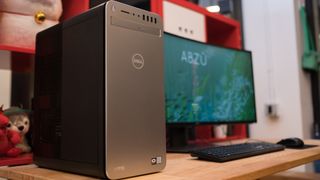
Best PC: Dell XPS Tower Special Edition

Don’t be fooled, this mainstream machine is a gaming PC at heart
CPU: : Intel Core i5 – Core i7 | Graphics: : AMD Radeon RX 580 – Nvidia GeForce GTX 1080 | RAM: 8GB – 16GB | Storage: 256GB SSD; 1TB HDD – 512GB SSD; 2TB HDD
Full online customer supportCompact, minimalist design
Starting memory isn't ideal for VR
Lower graphical performance compared to rivals
For lack of a better word, the Dell XPS Tower Edition is stealthy. Looking quite similar to that old computer that your parents had hidden beneath the desk, this boring exterior belies an exciting array of components. Inside you’ll find your choice of the latest in GPU tech, in addition to a blazing-fast 7th generation Intel CPU and a spacious hard drive and/or SSD. Now, the Special Edition is only available in the US, but our readers in the UK and Australia will still be able to buy the regular Dell XPS Tower and beef it up to the same level through Dell’s configuration page. 

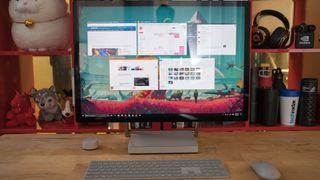
Best all-in-one PC: Microsoft Surface Studio

The art kid’s dream computer in a metallic nutshell
CPU: : Intel Core i5 – i7 | Graphics: : Nvidia GeForce GTX 965M – 980M | RAM: : 8GB – 32GB | Storage: : 64GB SSD; 1TB HDD – 128GB SSD; 2TB HDD

Impeccable build qualityThe best digital drawing board
All rearward ports
Pricey proposition for most
The Microsoft Surface Studio is one of the most glamorous PCs you can buy. It shakes up the all-in-one formula of putting all the components behind the screen, and instead moves everything to the base. The resulting device has one of the thinnest 28-inch PixelSense Displays that puts even most 4K screens to shame. What’s more, the fully-articulating stand makes it a versatile tool for work and play with Surface Pen support. All in all, the Surface Studio is an exceptional work of, and for, art.

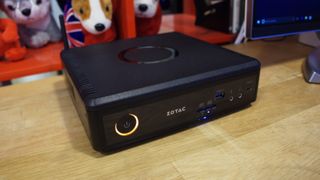
Best mini PC: Zotac Magnus EN1060

A VR-ready micro-machine
CPU: : Intel Core i5-6400T | Graphics: : Nvidia GTX 1060 (6GB GDDR5 VRAM) | RAM: N/A | Storage: N/A

Powerful and smallWhisper quiet
Requires some assembly
Limited upgradability
The Zotac Magnus EN1060 is practically as small as the Apple Mac Mini, but it’s an exponentially more powerful gaming PC, potent enough to drive virtual reality experiences. Thanks to its small size and understated features, users can place this mini PC under an entertainment center and it won’t draw attention to itself. Keep in mind, though, this system doesn’t come with storage or RAM pre-installed, not to mention it lacks an operating system, so interested users will need buy these components and software separately.

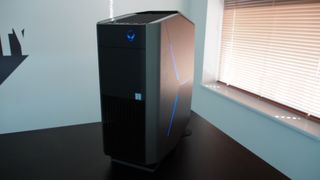
Best gaming PC: Alienware Aurora R6

Great gaming performance without breaking the bank
CPU: Intel Core i5 – i7 | Graphics: AMD Radeon RX 560 – Nvidia GeForce GTX 1080 Ti | RAM: 8GB – 64GB | Storage: 1TB – 2TB HDD, 256GB - 1TB M.2 PCIe SSD, 2TB HDD

Distinct case designEasy to upgrade
Partially obstructed cooling
The Alienware Aurora R6 is an excellent gaming PC that offers brilliant performance in a conveniently compact body. The affordable price is pretty great as well, considering the power on offer and users itching for upgrades will have room to pick up a second graphics card, plus more RAM and storage.

Best living room PC: MSI Trident 3

A slimline console-sized mini PC for your living room
CPU: Intel Core i5-7400 – i7-7700 | Graphics: Nvidia GeForce GTX 1050 Ti – 1060 | RAM: 8GB – 32GB DDR4 (2,400MHz) | Storage: 2TB HDD; 120GB SSD – 2TB HDD; 1TB SSD

Silent and cool runningCompact size
External 330W power brick
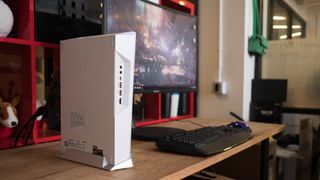
Positioned as a “console killer,” the MSI Trident 3 looks a lot like an Xbox One X and PS4 Pro, but it’s a far more powerful PC that feels just right in your living room. Complete with all the ports you could ever dream of, the MSI Trident 3’s advantages are clear. Still, in trying to be as thin and light as possible, the MSI Trident 3 comes equipped with a 330W external power supply brick, resembling some of the least attractive console designs.
Apple iMac

Best Mac: Apple iMac (2017)

A powerful, price-efficient (albeit old-hat) package
CPU: Intel Core i5 – i7 | Graphics: Intel Iris Plus Graphics 640 – AMD Radeon Pro 560 | RAM: 8GB – 32GB | Storage: 1TB HDD – 1TB SSD

Excellent valueGorgeous 4K, P3 color display
Poor audio performance
Baffling mouse charging method
You wouldn’t see it coming based on the logo alone, but Apple’s latest iMac is neatly priced when compared to other all-in-one computers out there. In fact, the Surface Studio costs three times as much as the iMac to start. Despite lacking the fancy trimmings of its Microsoft-contrived competitor, e.g., a touchscreen and adjustable stand, the option for a 4K P3 wide color display and 7th-generation processor make the 21.5-inch iMac not only gorgeous, but up to date as well.
HP Pavilion Mini

Best budget PC: HP Pavilion Wave

It's a prettier, if less-beefy, Mac Pro
CPU: Intel Core i3 – Intel Core i5 | Graphics: Intel HD Graphics 530 – AMD Radeon R9 M470 | RAM: 8GB | Storage: 1TB HDD

Clever and effective audio solutionUnique, stylish cylindrical form factor
No optical audio port
Unflattering specs
Though at first you might confuse it for a fabric-woven Mac Pro refresh, the HP Pavilion Wave is anything but. This compact Windows machine packs in 6th-generation Intel Core processors and optional discrete AMD graphics with a uniquely integrated Bang & Olufsen speaker. Wrapped in a handsome fabric exterior, this is the perfect PC to have on the desk, as it radiates crisp sound while you browse the web or watch movies.
HP 260 G1

Best stick PC: Intel Compute Stick

The tiny computer that can
CPU: Intel Atom – Intel Core m5 | Graphics: : Intel HD Graphics – Intel HD Graphics 515 | RAM: 1GB – 4GB | Storage: 8GB-64GB eMM
Wide CPU choices

Extremely portable design
Limited fan cooling
Limited RAM and storage
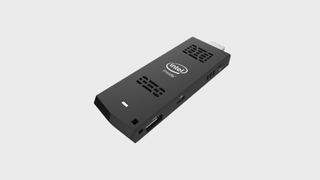
No, this isn’t a USB thumb drive you’re looking at. The Intel Core Compute Stick might look like something you would store a PowerPoint presentation on shortly before losing it, but it’s actually a palm-sized personal computer that plugs into any screen with an HDMI port. Configurations start at a lowly 1.33GHz Intel Atom processor running Linux, and at the highest end is a notebook-class Intel Core m5 processor.
Malware authors are so nefarious that they create deadly viruses to uncover your monetary data or prevent your PC from working by any means. What you require is the most ideal antivirus programming on your PC. Thanks to the lucky stars, as the giant leaders in the security industry do deliver their best products for free.. Many organizations offer free forms of their prevalent antivirus programs for their clientsa. My top picks are Comodo Free Antivirus, Avast! Free Antivirus, AVG Anti-Virus Free, and the list ends with similar alternatives however make sure to look through the in order list underneath to understand the best free antivirus for you.
free antivirus 2017

Top 10 Best Free Antivirus Software – Updated Oct 2018

  1. Comodo Free Antivirus
  2. AVAST Free Antivirus
  3. AVG Free Antivirus
  4. Avira Free Antivirus
  5. Bitdefender Free Antivirus
  6. Microsoft Security Essentials (MSE)
  7. Ad-Aware Free Antivirus
  8. Amiti Free Antivirus
  9. Panda Free Protection
  10. Baidu Antivirus
Comodo Free Antivirus
Comodo offers the best antivirus software available in the market. It takes the lead amongst its counterparts as it incorporates the best of its innovation – the Defense+ technology, containment techniques, sandboxing and what not to assure free virus protection that is 100% efficient. Comodo Antivirus outsmarts the alternative as it quarantines the unknown file and executes the same in the isolated environment denying interference to the company’s normal operations. The Antivirus supports Windows 10, Windows 8, Windows 7, Windows Vista, and Windows XP. It stays updated on the latest virus definitions so stands robust to defeat even the most latest malware threats.
AVAST Free Antivirus
AVAST Free Antivirus definitely should be on any rundown of the best free antivirus programs. The free antivirus from AVAST is feature-filled antivirus and antispyware system shielding your PC from dangers from the web, your documents, messages, and even unknown texts. It features the “heuristics engine” which helps to identify the previous unknown threats as well.
I additionally like the way that AVAST has been making antivirus item since 1988 and is frequently referred to as the most introduced antivirus software.
AVG Free Antivirus
AntiVirus Free from AVG is one of the best free antivirus programming systems accessible and is likely our undisputed choice.AVG AntiVirus Free is no doubt an undisputable antivirus and antispyware software that, incorporates an email scanner, connect scanner, planned filtering choices, programmed updates, and more. There is no compelling reason to pay for an antivirus program when AVG provides a power packed free antivirus system to drive away your threats.
Here are the reasons why the AVG AntiVirus Free is one of the most elite free antivirus programs accessible today:
  1.  It features immense number of premium traits,
  2.  Devised to stay updated on the latest virus definition
  3.  There is never a look back after installation
Avira Free Antivirus
Avira Free Antivirus shields you from malicious infections, worms, Trojans, spyware, adware, and different sorts of malware, making it a completely utilitarian anti-malware system and one of the best free antivirus programs. It supports Windows 10, 8, 7, Vista, and XP operating system. Avira Free Antivirus has a propelled heuristic mechanism which is a component not generally found in most of the free antivirus devices. Above all, it is also pliable to support Mac operating systems.
However, being a novice, the configuration after installation was challenging and that would be one factor to pull down the rating.
Bitdefender Free Antivirus
Bitdefender Antivirus Free Edition is keeping pace with any of the ostensibly better-known free antivirus programs ​on this rundown. Here are some key takeaways on the Bitdefender Antivirus Free Edition:
  1. It is simple to set-up and arrange
  2. It  does not use much of the system resources
  3.  It is not bothersome with self-promoting ads to upgrade to it’s paid subscriptions and offers.
The Bitdefender Antivirus Free Edition is simple to install and easy to use – most at the user’s convenience. It is user-friendly than any other antivirus programs. It helps to stay ahead of threats by updating the latest virus definitions.
Microsoft Security Essentials (MSE)
Security Essentials from Microsoft is certainly one of the best free antivirus programs. Security Essentials is a top-notch antivirus program that shields you from a wide range of malware, easy to use, and gets updated on threats automatically.
Two good reasons for Microsoft security essentials to top the list are:
  1. The antivirus system is inbuilt which is by default – a part of Microsoft
  2. Simple to use.
  3. The software boasts of a user-friendly interface.
Ad-Aware Free Antivirus
Lavasoft’s Ad-Aware Free Antivirus+ program is unique from any other ad-aware you have used. This program is genuine and totally a free antivirus program. Ad-Aware Free Antivirus+ supports Windows 10, 8, 7, Vista, and XP. The antivirus provides instant, real-time system protection from spyware, viruses, and other malicious forms. It assures to be in silent mode when the user is gaming or while the user watches movies to mitigate the interference on the system resources.
Amiti Free Antivirus
Amiti Free virus is designed specially to protect Windows. It provides consistent virus protection with heuristic scanning system all equipped for an on-access protection. It ensures scheduled scans and automatic updates on the latest malware definitions. It also provides multiple types of scan options.
Panda Free
Panda Protection which was  Protectiononce known as Panda Free Antivirus is another best antivirus on this list. It delivers absolute free protection to defy the most challenging unknown threats. Works well at par with other free antivirus we have identified.
  1. It ensures URL and web filtering   
  2. It provides automatic USB protection
  3. It supports all versions of Windows operating system- 10, 8, 7, Vista and XP.
Baidu Antivirus
Baidu Antivirus 2015 is feature-packed to fight against malware through its cloud-based database which is updated with the latest virus definitions. It delivers prompt protection much instantly utilizing minimal system resources, and operates to perfection just as other free antivirus programs in the list.